Buyer's Guide · October 2026
Best Workforce Planning Software for 2026
A practical guide to the tools that run workforce planning, from the FP&A engines (Anaplan, Workday Adaptive, Pigment) and HR analytics platforms (Visier, Orgvue, ChartHop) to the HCM suites and the operational schedulers (UKG, Dayforce, Quinyx, Planday), sorted into the six categories that actually solve different problems, with G2 ratings, pricing and the strategic-versus-operational trap to avoid.


The verdict
- Best for large enterprise, finance owns headcount planning
- Anaplan or Workday Adaptive, Anaplan is the deepest connected-planning engine (and priciest); Workday Adaptive is strongest if you already run Workday HCM. Both quote-only and finance-led.
- Best mid-market, finance owns it
- Planful or Vena Solutions, Planful has a dedicated, named Workforce Planning module; Vena is Excel-native and keeps the spreadsheet as the front end. Both around $34K to $40K a year (est).
- Best HR-owned, analytics and org-design-led
- Visier, ChartHop or Orgvue, Visier for people analytics at scale, ChartHop for scaling tech managing constant org change, Orgvue for restructuring and operating-model redesign.
- Best if you already run a big HR suite
- SAP SuccessFactors or Oracle Fusion HCM, strategic workforce planning as a suite module, convenient on-platform, with real adoption and complexity caveats.
- Best for hourly and frontline scheduling
- UKG, Dayforce, Quinyx or Planday, UKG or Dayforce at enterprise scale (both carry HCM), Quinyx for AI auto-scheduling in Europe, Planday for SMB shift businesses with published pricing.
- Best for agencies planning people across projects
- Runn, real-time resource and capacity planning for project-based firms, with transparent per-seat pricing ($7 to $11 per seat).
- Best people foundation underneath any plan
- Sageo, not a planning tool, but the role architecture, competency framework and calibrated performance read a headcount model is only as good as, at a flat EUR 6 per seat in a quote-only category.
Bottom line. Workforce planning software is not one market, it is six. Enterprise FP&A engines (Anaplan, Workday Adaptive, Pigment) and mid-market FP&A (Planful, Vena) do finance-owned headcount and cost modelling; analytics and org-design tools (Visier, Orgvue, ChartHop) do HR-owned strategic planning on people data; HCM suites (SAP, Oracle) bundle it as a module; operational WFM (UKG, Dayforce, Quinyx, Planday) does scheduling and rostering; and Runn does project resource planning. The deepest divide is strategic/financial planning versus operational scheduling, and no tool serves both well, so name your job first. Only Planday and Runn publish pricing; everything else is quote-only. Sageo is not a planning tool; it builds the role, competency and calibrated-performance foundation a headcount plan depends on.

For founders, CEOs, CFOs and people leaders trying to buy "workforce planning software." The first thing to know is that the term covers at least six different products that solve different problems for different buyers. A CFO modelling next year's headcount budget and a store manager rostering Saturday's shifts are both doing "workforce planning," and no single tool here serves both well. This guide sorts the market into its real categories, compares the 15 leading tools inside them, and is honest about where Sageo does and does not fit.
A note on who wrote this
Sageo publishes this guide, and Sageo is not a workforce planning tool. It does not model headcount cost, build financial scenarios, or roster shifts. We say that plainly, because the honest version is more useful than a stretch. Where Sageo is relevant is narrower and we are explicit about it near the end: it builds the role, competency and calibrated-performance foundation a headcount plan is only as good as. Every competitor figure comes from vendor product and admin docs, G2, Capterra, TrustRadius and Gartner Peer Insights, and procurement aggregators (Vendr, CostBench) as of October 2026. Ratings for the suites and FP&A platforms are platform-wide, not workforce-module-specific, because no source rates the workforce module in isolation. Only two vendors here publish real pricing, so treat every other price as an estimate and confirm it before you buy.
1. Which workforce planning software should you choose?
Pick the category first, then the tool. The right answer depends on three things: whether you are planning strategically (headcount and cost) or operationally (schedules and shifts), who owns the budget (finance, HR or operations), and what system your data already lives in.
- Large enterprise, finance owns headcount planning
- Anaplan (the deepest connected-planning engine, and the priciest) or Workday Adaptive Planning (strongest if you already run Workday HCM). Pigment if you want a modern UI and can accept less maturity. All quote-only and finance-led.
- Mid-market, finance owns it
- Planful, which has a dedicated, named Workforce Planning module, or Vena Solutions if your team lives in Excel and wants to keep the spreadsheet as the front end.
- HR owns it, analytics-driven
- Visier for people analytics and planning at scale, ChartHop for scaling tech companies managing constant org change, or Orgvue for restructuring and operating-model redesign.
- You already run a big HR suite
- SAP SuccessFactors or Oracle Fusion Cloud HCM, where strategic workforce planning is a suite module. Convenient if you are already on the platform, with real adoption and complexity caveats.
- Hourly and frontline workforces, operational scheduling
- UKG Pro or Dayforce at enterprise scale (both carry full HCM too), Quinyx for AI auto-scheduling (especially in Europe), or Planday for SMB shift businesses with the only genuinely published pricing in that group.
- Agencies and consultancies planning people across projects
- Runn, a resource and capacity planning tool for project-based firms. A different flavour entirely: not headcount cost, not scheduling.
- The people foundation underneath any of the above
- Sageo, used alongside your planning tool. It produces the role architecture, competency framework and calibrated performance read that a headcount model assumes you already have. More in section 9.
The honest headline: there is no single best workforce planning tool, because the buyers want different things. Decide whether your problem is strategic (a multi-year headcount and cost plan) or operational (next month's rota) before you shortlist, because the two share a name and almost nothing else. Get that split wrong and every demo afterwards is a waste of time.
2. What is workforce planning software, really?
This is the single most valuable move a buyer can make, because the category confusion is your biggest risk. The 15 tools in this guide fall into six buckets. The bucket, not the brand, is what you pick first.
- A. Enterprise FP&A and connected-planning engines
- Workday Adaptive Planning, Anaplan, Pigment. Finance-owned, driver-based headcount and cost modelling reconciled with the financial plan. Deep, powerful, expensive and quote-only.
- B. Mid-market FP&A with a workforce module
- Planful, Vena Solutions. The same job as bucket A at mid-market scale and price. Planful has a dedicated Workforce module; Vena is Excel-native.
- C. Analytics and org-design-led strategic planning
- Visier (people analytics first), Orgvue (org design first), ChartHop (people-ops and org chart first). HR-owned planning driven by people data and org structure rather than finance models.
- D. Enterprise HCM suites with a workforce-planning module
- SAP SuccessFactors, Oracle Fusion Cloud HCM. Full HR suites where strategic workforce planning is one module, best for organisations already on the suite.
- E. Operational workforce management
- UKG Pro, Dayforce, Quinyx, Planday. Shift scheduling, time and attendance, and labour-demand forecasting for hourly and frontline workforces. UKG and Dayforce also carry full HCM; Quinyx and Planday are scheduling-focused (Planday the SMB end).
- F. Resource and capacity planning
- Runn. Planning people across projects for agencies and consultancies. Not headcount cost, not scheduling.
The dividing line
The deepest split is strategic and financial workforce planning (headcount plus cost: buckets A, B, C and D) versus operational workforce management (scheduling plus rostering: bucket E), with resource planning (F) a project-based variant of its own. They share a name and little else. A CFO planning next year's headcount budget and a store manager rostering Saturday's shifts are both "workforce planning," and no single tool in this guide serves both well. If you take one thing from this page, take that.
Where Sageo sits: outside all six. Sageo is HR-owned, culture-first performance management and org design for 10 to 1,000 employees. Its nearest neighbours here are the org-aware tools (ChartHop and Orgvue), but even those solve a different problem (headcount and reorg data) than Sageo (roles, competencies, development and calibrated performance). It is adjacent to this category, not a competitor within it. Section 9 is the honest version of where it helps.
3. How do the workforce planning tools compare?
| Tool | Category | What its workforce planning is | Pricing | G2 (reviews) |
|---|---|---|---|---|
| Sageo | People foundation | Feeds planning: competency framework, org chart, calibrated performance and development; no headcount-cost model or scheduling | EUR 6 PEPM, published | n/a |
| Anaplan | A. Enterprise FP&A | Deep driver-based headcount, position and capacity planning on a connected-planning engine | Quote; ~$115K median/yr (est) | 4.6 (488) |
| Workday Adaptive | A. Enterprise FP&A | Dedicated Headcount Planning app plus cost modelling, strongest on Workday HCM | Quote; ~$94K to $108K/yr top edition (est) | 4.3 (409) |
| Pigment | A. Enterprise FP&A | Headcount, hiring and capacity planning with modern UI; workforce sold as an add-on module | Quote; ~$75K to $227K/yr (est) | 4.6 (~111 to 123) |
| Planful | B. Mid-market FP&A | Dedicated Workforce Planning module (headcount, comp, scenarios); Workforce Pro tier adds depth | Quote; ~$40K median/yr (est) | 4.3 (509) |
| Vena Solutions | B. Mid-market FP&A | Excel-native headcount and labour planning with pre-built payroll logic | Quote; ~$34K median/yr (est) | 4.5 (481) |
| Visier | C. Analytics-led | Headcount and cost planning plus skills planning on live, benchmarked people data (needs the analytics core) | Quote, per-employee (est) | 4.6 (223) |
| Orgvue | C. Org-design-led | Org design, spans-and-layers, and supply-demand gap modelling (a digital twin of the org) | Quote, enterprise | 4.4 (16) |
| ChartHop | C. People-ops-led | Headcount planning on a live interactive org chart with drag-and-drop reorg scenarios | Quote, modular (~$9K min est) | 4.4 (171) |
| SAP SuccessFactors | D. Enterprise HCM | Strategic Workforce Planning module (demand, supply, gap, scenarios) on SAP Analytics Cloud | Quote, PEPM (~$28 to $38 suite est) | 4.1 (1,657) |
| Oracle Fusion HCM | D. Enterprise HCM | Strategic WFP assembled from Fusion modules, connected to Oracle Financials | Quote, PEPM (est) | 3.8 (90) |
| UKG Pro | E. Operational WFM | AI scheduling, ML labour forecasting and a newer Strategic WFP module | Quote; ~$32 to $41 PEPM (est) | 4.3 (2,256) |
| Dayforce | E. Operational WFM | Auto-scheduling and ML demand forecasting, plus a new Agentnoon-based Strategic WFP | Quote; WFM ~$5 to $8 PEPM (est) | 4.2 (962) |
| Quinyx | E. Operational WFM | AI auto-scheduling and 20-plus-model labour forecasting for frontline shifts | Quote; ~$5 to $8 PEPM (est) | 4.3 (~522 to 536) |
| Planday | E. Operational WFM | SMB-to-mid-market scheduling, rostering and time tracking | Published ~EUR 2.49 to 6.49/user | 4.5 (88) |
| Runn | F. Resource planning | Real-time resource and capacity planning across projects for agencies and services firms | Published $7 to $11/seat | 4.8 (33) Capterra |
4. How does each tool compare, in depth?
Grouped by category. Sageo comes first because it is the odd one out, the foundation underneath the category rather than a planning tool, so you can see upfront what it does and does not do.
Sageo
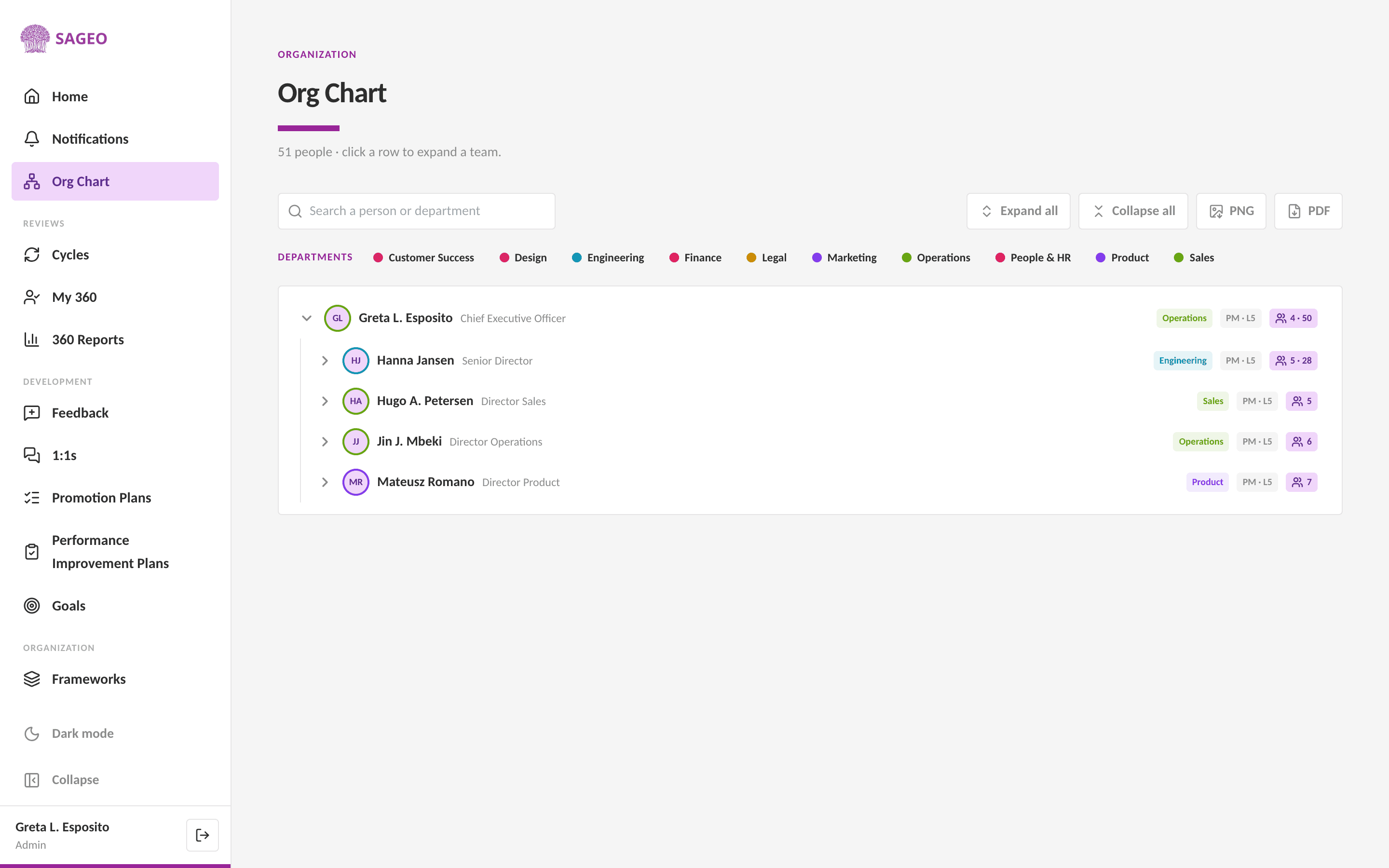
Sageo is a culture-first performance and org platform, not a workforce planning product. It does not model headcount cost, build financial scenarios, or roster shifts. What it does is produce the layer a workforce plan assumes you already have: a competency and levelling framework generated from your values, an org chart with roles and reporting lines, calibrated 360 reviews scored against the framework, and AI development plans to close the gaps. A headcount model that plans "five more senior engineers" is only as meaningful as your definition of what senior looks like and your honest read of who is already there, and that definition and read are what Sageo makes real.
Key features
A values-based competency and levelling framework
the role architecture a headcount plan maps against, generated by AI rather than bought as a generic library.
An org chart with roles, levels and reporting lines, so the structure a plan reshapes is accurate before you model it
Calibrated 360 reviews with an immutable audit trail, so the performance and potential signal feeding any plan is consistent and defensible
AI development plans drafted from review gaps, with personal identifiers stripped before any LLM call and a person reviewing every AI output
Best for
Teams of 10 to 1,000 that want the role, competency and performance foundation right before, or alongside, a workforce planning or FP&A tool, and that care about defensible, auditable people decisions.
Pricing
EUR 6 per seat per month, every module included, billed annually with a 10-seat minimum. Published and flat, in a category that is overwhelmingly quote-only.
What users say
Praised
- values-based frameworks, calibration rigour, and a concrete AI-governance story.
Watch out for
- no headcount-cost modelling, financial scenarios or scheduling. If you need those, pair Sageo with a tool from the categories below.
- Sageo is rated for performance and culture, not as a workforce planning tool, so it carries no workforce-planning G2 score.
Where it fits: the foundation, not the plan. Build the role, competency and calibrated-performance layer in Sageo, then feed it into a workforce planning engine (or an HCM suite) when you need headcount-cost models and scenarios. More in section 9.
Category A: Enterprise FP&A and connected-planning engines

See how Sageo actually works
An interactive walkthrough of frameworks, 360 reviews, calibration, and monthly 1:1s.
Explore the WalkthroughAnaplan
Anaplan is a connected-planning platform where finance, sales, supply chain and workforce run on one modelling engine, giving a single view of workforce and cost. It is the depth leader of this category, and the priciest.
Key features
Headcount and position planning (Headcount Expense Planning) to optimise headcount and close redundant or unbudgeted requisitions
Compensation planning focused on the cost and business impact of workforce decisions, with hiring aligned to the financial budget
Capacity planning that gives transparency into hiring and skills-development needs and aligns recruiting capacity with demand
AI
PlanIQ forecasting, a CoPlanner assistant, and a dedicated role-based Workforce Analyst agent that flags workforce risks and models headcount impact (announced December 2025, general availability expected Q1 2026).
Best for
Large enterprise, finance-led but cross-functional, with the modelling capacity to build and run models; a strength in financial services and banking. Vendor-claimed 2,800-plus customers.
Pricing
Quote-only and tiered by user type, with no free trial. Vendr estimates a median around $114,609 a year (67 purchases), a range of roughly $30,590 to $301,931, and implementation 50 to 150 percent of first-year subscription. Budget six months to implement and around 15 months to ROI.
What users say
Praised
- driver-based planning, handling large data ("Excel on steroids"), and cross-department versatility.
Watch out for
- a steep learning curve, a UI that is not beginner-friendly, high cost, and a poor fit for transactional data sources.
- Rated 4.6 on G2 (488 reviews) and 4.2 on Capterra (33); 8.6 on TrustRadius.
Where it fits: the deepest, most flexible engine for large enterprises whose finance team owns headcount planning and can absorb the cost and the build. Owned by Thoma Bravo since 2022.
Workday Adaptive Planning
Workday Adaptive Planning is the workforce planning module inside Workday's cloud FP&A platform, where finance and HR model headcount, cost and org scenarios and publish approved plans into Workday HCM. Its draw is native integration when you are already on Workday.
Key features
A dedicated Headcount Planning application for who to hire and when, including hiring timing and attrition, with HR and stakeholders collaborating on the plan
Cost and compensation modelling that keeps headcount, cost and hiring reconciled with the financial plan, with salary as a scenario driver
Unlimited what-if scenarios across org changes, spans of control, layers and job levels, with side-by-side structure comparison
AI
Elastic Hypercube Technology, an in-memory calc engine for instant what-if modelling, plus Workday Illuminate agents and a Predictive Forecaster.
Best for
Mid-market to large enterprise where finance owns headcount planning, strongest where the company already runs Workday HCM. Workday-wide scale is over 11,000 organisations.
Pricing
Quote-only and seat-based (modeller, contributor, viewer). Third-party estimates (Redress Compliance, not a Workday price list) put the top edition near $94,000 to $108,000 a year on a three-year term, with edition list prices around $36,000 to $135,000 a year for 20 users. Treat as directional.
What users say
Praised
- the Elastic Hypercube calc engine, scenario modelling, collaborative budgeting and OfficeConnect Excel reporting.
Watch out for
- a steep learning curve, heavy setup requiring vendor back-and-forth, limited dashboard customisation, and a dated HR interface.
- Rated 4.3 on G2 (409 reviews) and 4.5 on Capterra (235); 7.8 on TrustRadius.
Where it fits: the natural choice when you already run Workday HCM and want headcount, cost and scenarios reconciled in one place. Co-founder Aneel Bhusri returned as Workday CEO in February 2026.
Pigment
Pigment is a modern business-planning platform (EPM) positioned as a faster, better-looking alternative to legacy tools like Anaplan and Adaptive, with headcount and workforce planning as a core use case. Its edge is UI and speed; its trade-off is relative youth.
Key features
Headcount and capacity planning that forecasts the employees needed to meet goals and shows gaps between budgeted headcount and actuals, with P&L impact
Hiring and position planning with "to be hired" approval workflows across hiring managers, talent acquisition and finance
What-if scenario modelling on hiring and compensation assumptions, plus org-chart modelling of any hierarchy directly in Pigment
AI
a Pigment AI layer plus Frames (custom interfaces on a live model), and Analyst, Planner and Modeler agents (announced March 2025; Analyst in private preview, the others on roadmap).
Best for
Mid-market to enterprise, high-growth companies, finance and FP&A-owned with HR and talent acquisition as collaborators; less of a fit for small businesses. Named customers include Unilever, Datadog, Figma and Klarna.
Pricing
Quote-only across three tiers with no free plan. Estimates put annual spend around $75,000 to $227,000, with a median contract near $106,250 (Vendr, directional) and Workforce sold as a priced add-on module of roughly $30,000 to $50,000. Confirm directly.
What users say
Praised
- flexibility, dashboards, a modern UI, and headcount automation that saves significant time.
Watch out for
- a steep, scripting-like learning curve, occasional crashes on large datasets, fewer native integrations than incumbents (around 18 versus 100-plus), and less maturity given its 2019 founding.
- Rated 4.6 on G2 (around 111 to 123 reviews) and 9.2 on TrustRadius (21).
Where it fits: the modern pick for finance-led headcount planning when UI, speed and collaboration matter and you can accept a younger, less integration-rich platform.
Category B: Mid-market FP&A with a workforce module
Planful
Planful (formerly Host Analytics) is a mid-market FP&A platform with a dedicated, named Workforce Planning module that connects headcount, compensation and cost in one model synced to the financial plan. Among the mid-market tools, it is the one built specifically for this job.
Key features
Base Workforce Planning
headcount tracked plan-to-hire, compensation modelling (salaries, bonuses, commissions, equity), and employee-level tracking from hire to departure.
What-if and scenario evaluation of org changes with cost and P&L impact, plus capacity planning against demand
An Advanced Workforce Pro tier adding Headcount Rollforward, a Variance Bridge (salary-spend change by driver), a Custom Comp Builder and HRIS actuals import
AI
Planful AI to guide compensation decisions, plus the Predict suite (Signals, Projections), which is general FP&A and not purpose-built for workforce or attrition.
Best for
Mid-market to lower-enterprise, finance-led (CFO, VP Finance, FP&A), with a base centring on 20 to 200 users. Over 1,500 customers; named customers include Bose, Five Guys and Zappos.
Pricing
Quote-only with no free plan, across Standard and Enterprise editions. Vendr estimates a median around $40,352 a year (73 purchases), with the Workforce Pro tier a paid add-on that one reviewer says costs nearly as much as the base. Treat ranges as directional.
What users say
Praised
- a powerful reporting, forecasting and budgeting tool, initially easy to set up, with useful AI investigation insights.
Watch out for
- a steep learning curve, basic dashboards with limited visualisation, and performance when data gets large.
- Rated 4.3 on G2 (509 reviews) and 4.3 on Capterra (76); 8.4 on TrustRadius.
Where it fits: the mid-market default when finance owns workforce planning and wants a dedicated module rather than a spreadsheet. Owned by Vector Capital; John Herr (ex-Adaptive Insights) became CEO in October 2025.
Vena Solutions
Vena is an Excel-native FP&A platform where workforce planning runs on driver-based calculations over a governed central cloud database, with the spreadsheet as the front end. Its whole premise is to keep the Excel workflow your team already knows and add governance underneath.
Key features
Headcount and labour planning of salaries, benefits and taxes by department, employee and position, combining bottom-up inputs with top-down drivers
Headcount tracking of upcoming hires, terminations, transfers and allocations, with pre-built US payroll logic (FICA, FUTA, SUTA, 401k) plus Canadian and UK benefits
What-if modelling of payroll, tax and fringe-benefit changes and reorganisations, using pre-built Strategic Workforce Planning and Labor Expenses Excel templates
AI
Vena Copilot, agentic AI powered by Microsoft Azure OpenAI, with Reporting and Analytics agents (2024) and a Planning agent (2025 roadmap); Vena states it does not train public AI models on customer data.
Best for
Mid-market primarily (200 to 1,000 employees) scaling into enterprise, finance and FP&A leaders in Excel-heavy teams. Over 900 customers; passed $100M ARR in FY25.
Pricing
Quote-only, custom and modular, with no published tiers. Vendr estimates a median around $34,286 a year (34 deals) with a range of roughly $9,343 to $73,500, and implementation around 25 to 50 percent of first-year spend. Higher-complexity figures vary, so treat as directional.
What users say
Praised
- Excel familiarity ("if you know Excel, you'll be able to master Vena"), consolidation, audit trails, and Power BI dashboards.
Watch out for
- performance lag on large models, cumbersome dashboard customisation, occasional ERP/HRIS data mismatches, and a steep curve for non-Excel users.
- Rated 4.5 on G2 (481 reviews) and 4.5 on Capterra (139); 8.1 on TrustRadius.
Where it fits: the pick when your finance team lives in Excel and wants a governed database and audit trail without giving up the spreadsheet. Vista Equity Partners took a minority stake in 2021.
Category C: Analytics and org-design-led strategic planning (HR-owned)
Visier
Visier is a people-analytics platform first, with workforce planning as a layer that runs against live, consolidated, benchmarked people data rather than static spreadsheets. Its draw is that the plan sits on top of genuinely good analytics.
Key features
Headcount and Cost Planning to set a headcount goal and model the external hires needed (this specific model is a fixed template, not fully customisable)
Headcount forecasting that projects known starts, expected backfills, pipeline hires and expected exits
Skills Planning (powered by the acquired Boostrs engine) to define a target skill profile, compare against current, and model hiring mix and upskilling, plus a benchmark Community dataset
AI
Vee, a generative-AI conversational assistant over Visier People (in-platform and in Slack and Teams), plus predictive attrition and forecasting models.
Best for
Mid-market to large enterprise with complex, multi-source HR data; the buyer is a CHRO, Chief People Officer or VP of People Analytics. Planning requires the paid analytics core, so workforce planning cannot be bought standalone.
Pricing
Quote-only, typically per-employee, with no meaningful self-serve tier and no verified published rate. A category benchmark (ERP Research, not Visier's price) is roughly $21,000 to $37,800 a year for 100 seats, directional only. Expect around six months to implement.
What users say
Praised
- visualising and housing people data and scaling to many users ("essential to everything that we do").
Watch out for
- predictive model depth (TrustRadius rates predictive analytics below the category average), front-end customisation limits, and one reviewer saying the planning solution "should be enhanced to support strategic workforce planning."
- Rated 4.6 on G2 (223 reviews) and 8.2 on TrustRadius (91); Capterra has too few reviews to generalise.
Where it fits: the choice when people analytics is the lead story and you want planning that runs on live, benchmarked data, as long as you are buying the analytics core anyway.
Orgvue
Orgvue is an organisational-design and workforce-planning platform that builds a visual "digital twin" of the organisation's structure, cost and workforce for restructuring and reorg decisions. Its centre of gravity is org design, with workforce planning alongside it.
Key features
Org design and modelling with spans-and-layers analysis, cost and activity analysis, benchmarking, and drag-and-drop scenario modelling of current versus target structure
Workforce planning via supply-and-demand gap modelling by role cluster, headcount and cost forecasting (using drivers such as attrition and retirement), and actual-versus-plan tracking
Job architecture and skills (turning inconsistent titles into role families), critical-position risk scoring, and executive-ready org charting (the top-praised strength)
AI
the Henshaw suite, Roles (automated role clustering), Assistant (natural-language queries) and Cleaner (AI data cleansing), plus an MCP interface for AI agents in beta.
Best for
Large enterprise (FTSE 100, S&P 100, global) running restructuring or operating-model redesign, plus the 50-plus management consultancies that use it to deliver client reorg projects. Around 200 enterprise customers; named customers include Salesforce, Tesco and Mars.
Pricing
Quote-only, with no public price list, free trial or self-serve (a demo and needs assessment are required). Only a directional category benchmark exists; it is characterised as expensive, enterprise-tier and custom-contracted.
What users say
Praised
- turning data into powerful visual insights and saving time versus Excel and PowerPoint.
Watch out for
- a steep learning curve, reliance on the Orgvue team, integration gaps (some users still upload manually), and even its own users rating it stronger on org design than on pure workforce planning.
- Rated 4.4 on G2 (16 reviews) and 9.7 on TrustRadius (3); all pools are very small, so treat as directional.
Where it fits: the enterprise choice for restructuring and operating-model redesign, when org design is the real job and workforce planning comes along with it. Main Capital Partners took a majority stake in September 2026.
ChartHop
ChartHop is an org-chart-centred people-operations and "organisational intelligence" platform where HR and finance model headcount, cost and structure on live org data synced from HRIS, payroll and ATS. Its planning surface is the org chart itself.
Key features
Headcount planning on live org data, modelling budget impact on headcount, cost and structure before committing
An interactive org chart as the planning surface, with drag-and-drop reorg modelling, visual scenarios assessed by budget and demographic impact, and "time travel" to any past date
Position management and approvals (open, update, backfill with routing), where approved requisitions push to the ATS, plus a compensation module and AI-powered people analytics
AI
"Ask ChartHop" answers plain-language questions across systems, and a 2026 pivot "from a system of intelligence to a system of action" toward AI agents.
Best for
Startups and scale-ups through mid-market, tech-heavy, high-growth People and Finance teams managing frequent org change. Named customers include 1Password, Airbnb and Sweetgreen.
Pricing
Now quote-only and modular (Core plus add-on modules). Third-party estimates (CostBench, which conflicts with the vendor) cite legacy per-employee pricing around $5 per employee for Core plus about $4 each for HRIS, Headcount Planning and Compensation modules, with roughly a $9,000 minimum. Treat per-employee figures as estimates.
What users say
Praised
- centralising people data in one place, accurate data mapping, and ease of navigation.
Watch out for
- laggy performance, long implementation, and hard-to-reach customer support.
- Rated 4.4 on G2 (171 reviews) and 4.6 on Capterra (79); 8.6 on TrustRadius.
Where it fits: the pick for scaling tech companies that live in the org chart and want headcount planning and reorg scenarios on live data. Backed by Andreessen Horowitz.
Category D: Enterprise HCM suites with a workforce-planning module
 SAP SuccessFactors
SAP SuccessFactors is a full cloud HCM suite whose separately licensed Strategic Workforce Planning module runs on SAP Analytics Cloud, drawing on Employee Central as the HRIS core. It is the suite-led option for organisations already standardised on SAP.
Key features
Demand forecasting built from strategic output targets such as revenue, and supply forecasting that accounts for terminations and retirements
Gap analysis of supply versus demand, producing shortages and surpluses per planning dimension (org unit, location, job classification)
Scenario modelling (for example a high-growth case) with self-service and what-if capabilities, on top of a global HRIS core
AI
a Joule copilot plus Joule Agents for HR that plan and carry out multi-step workflows, and People Intelligence combining SAP and third-party data.
Best for
Large and global enterprise with complex, multi-country workforces already running SAP; the buyer is a CHRO and enterprise HR with heavy HR-IT involvement. SuccessFactors claims around 12,000 customers.
Pricing
Quote-only and per-employee-per-month; workforce planning has no separately published price and is bundled or quoted. Estimated full-suite pricing is around $28 to $38 PEPM (the planning analytics sit inside the top Full HCM Suite bundle), with implementation $100,000 to $500,000-plus. Expect around five months to implement and 21 months to ROI.
What users say
Praised
- full employee-lifecycle coverage, SAP integration, customisation and enterprise fit.
Watch out for
- a dated interface, a steep learning curve, cost, suite lock-in (you cannot buy planning standalone), and low adoption SAP itself reports for its workforce-planning tools.
- Rated 4.1 on G2 (1,657 reviews, whole suite) and 4.0 on Capterra (around 294); all ratings cover the full suite, not the planning module.
Where it fits: the convenient choice when you already run SuccessFactors and want planning in the same suite, with the adoption and usability caveats weighed honestly.
Oracle Fusion Cloud HCM
Oracle Fusion Cloud HCM is an enterprise HCM suite where strategic workforce planning is assembled from Fusion modules rather than bought as one product, connected to Oracle Financials. It suits existing Oracle shops that want planning wired to finance.
Key features
HCM-side Strategic Workforce Planning and Workforce Modelling to build multi-year plans, test scenarios (expansion, reorg, budget limits) and see workforce and financial effects connected to Fusion Financials
Core HR as the central source for org structures and job architecture, plus HCM Analytics dashboards for headcount, attrition, diversity and productivity
Dynamic Skills (AI inference) underpinning a shift from role-based to skills-based planning, with separate Workforce Management for operational scheduling and EPM Workforce for finance-owned headcount cost
AI
an AI Agent Studio plus 100-plus embedded agents, including a Positions Assistant (backfill-or-create decisions using budget and org data) and a Job Discovery Agent.
Best for
Large and global enterprises (Gartner positions it in the 1,000-plus employee segment), typically existing Oracle shops; the buyer is a CHRO and HR leadership plus IT, with finance often a co-buyer.
Pricing
Quote-driven and per-employee-per-month with heavy discounting, and no Oracle-published workforce-planning line item. Third-party estimates put Core HCM around $15 PEPM and Talent Management $4 to $8; the planning piece is not separately stated. Expect around 10 months to implement.
What users say
Praised
- value, strong security, workforce modelling and payroll.
Watch out for
- a steep learning curve (especially reporting), limited customisation, long integration times, cost, and an HCM-versus-EPM split that can require licensing two stacks.
- Rated 3.8 on G2 (90 reviews, as Oracle Global HR Cloud) but 4.8 on Gartner Peer Insights (around 400); sources disagree sharply, and all ratings cover the broad suite.
Where it fits: the option for existing Oracle enterprises that want planning connected to Fusion Financials, if you can navigate the module and licensing complexity.
Category E: Operational workforce management (scheduling and rostering)
 UKG Pro
UKG Pro pairs an HCM suite with a workforce-management product (formerly Dimensions and Kronos) centred on scheduling, time and attendance, and ML labour forecasting for large hourly workforces. It is operational-first, with a newer strategic planning module bolted on.
Key features
AI-powered scheduling recommendations and best-fit schedules across the workforce, with shift swaps and time-off from any device
A self-tuning, patented ML labour-forecasting algorithm that learns seasonal patterns and feeds forecasts directly into scheduling
Time and attendance with pay-rule enforcement and compliance automation, plus a newer Strategic Workforce Planning module (what-if scenarios, long-term labour-demand forecasting, gap analysis) rolled out first in Australia and New Zealand
AI
UKG Bryte AI, drawing on around 30 years of proprietary workforce data, with Bryte agents (Promotion, Continuous Compliance) running multi-step workflows under human approval.
Best for
Mid-market to large enterprise with large hourly and frontline workforces (UKG Pro targets around 750 to 25,000-plus employees); joint HR and operations buyers. Around 80,000 customers; named customers include Marriott, PepsiCo and Whole Foods.
Pricing
Quote-only and per-employee-per-month. Estimates put the full HCM-plus-WFM suite around $32 to $41 PEPM, with implementation $50,000 to $500,000-plus (around 40 to 70 percent of software cost). Expect around five months to implement and 21 months to ROI.
What users say
Praised
- employee self-service, payroll accuracy, standardising fragmented processes, and centralised scheduling.
Watch out for
- a clunky, dated backend, slow reporting on large datasets, weak non-US localisation, and the 2022 Kronos ransomware incident that still surfaces in reviews.
- Rated 4.3 on G2 (2,256 reviews, the largest pool here) and 4.3 on Capterra (733); 8.0 on TrustRadius.
Where it fits: an enterprise choice when operational scheduling for a large hourly workforce is the real need, with strategic planning a newer add-on rather than the reason to buy.
Dayforce
Dayforce (formerly Ceridian Dayforce) is a single-application global HCM suite with strong operational workforce management and a newer, acquisition-derived strategic workforce planning layer. Its hallmark is one data model from scheduling through to real-time pay.
Key features
Auto-generated scheduling weighing demand, labour budget, worker preferences and pay rates, with ML-powered demand forecasting from past trends, holidays, events and weather
Real-time time and attendance (mobile clock-in, geofencing, attestation) and labour budgeting that flags unplanned overtime
A single data model (one record for pay, time and HR) so scheduling flows into payroll and pay calculates in real time; a newer Strategic Workforce Planning module covers skills supply and demand, what-if scenarios and planning across permanent, contingent and gig workers
AI
Dayforce Co-Pilot across talent, HR service delivery and autonomous payroll, plus ML demand forecasting and AI scenario building in the strategic module.
Best for
Mid-market to large enterprise, shift-heavy workforces (strongest fit 1,000-plus employees), with cross-functional HR, payroll, finance and operations buyers. Named customers include Barnes & Noble, Harley-Davidson and PureGym.
Pricing
Quote-only and per-employee-per-month. Estimates put Core HR and Payroll around $6 to $12 PEPM, Workforce Management $5 to $8, and Talent Management $7 to $8, with implementation commonly $15,000 to $80,000-plus. Expect around seven months to implement and 22 months to ROI.
What users say
Praised
- the all-in-one integrated platform, ease of use, and a reliable scheduling-to-payroll flow.
Watch out for
- slow customer support, complex reporting, a limited mobile app, and occasional bugs and latency.
- Rated 4.2 on G2 (962 reviews) and 4.3 on Capterra (1,064); 7.9 on TrustRadius.
Where it fits: a strong single-platform choice for shift-heavy enterprises that want scheduling and payroll on one data model, with strategic planning a recent (Agentnoon-based) addition. Taken private by Thoma Bravo in February 2026.
Quinyx
Quinyx is a European-rooted, AI-powered operational workforce-management platform combining scheduling, labour forecasting, time tracking and engagement for frontline and shift-based workforces. Its standout is genuine AI auto-scheduling.
Key features
AI auto-scheduling (Auto-Schedule generates schedules in seconds; Auto-Assign matches shifts to employees by skills, certifications, availability and forecasted demand)
Demand and labour forecasting using 20-plus AI and statistical models on sales, transactions and foot traffic, auto-selecting the best model per location
Labour optimisation comparing scheduled versus optimal headcount, automatic compliance (labour laws, union agreements, local rules), and a frontline engagement layer
AI
Widget Brain-powered auto-scheduling and forecasting (from the 2020 acquisition), with a vendor-claimed 31 percent forecasting-accuracy improvement (no methodology given).
Best for
Mid-market to large enterprise, shift-based and hourly workforces at scale (largest install 70,000 employees), with a strong Europe and Nordics footprint; operations leaders plus HR teams. Named customers include McDonald's, Sysco and Maersk.
Pricing
Largely quote-only and per-employee-per-month, with no definitive public list. Estimates put it around $5 to $8 PEPM by features and support tier, with most implementations within two to three months and training sometimes charged extra.
What users say
Praised
- ease of use, AI scheduling, and time saved on admin.
Watch out for
- reporting complexity, less robust absence and leave management, mobile app glitches, and slow lower-tier support.
- Rated 4.3 on G2 (around 522 to 536 reviews) and 4.2 on Capterra (91).
Where it fits: the operational pick when AI auto-scheduling for a frontline workforce is the priority, especially across European operations.
Planday
Planday is an SMB-to-mid-market operational employee-scheduling and shift-planning platform for shift-based businesses, now owned by Xero. It is the accessible, published-price end of operational workforce management.
Key features
Scheduling and rostering on web and mobile with templates and a configurable org structure, plus auto-scheduling on higher tiers
Time and attendance (phone clock in and out, timesheets, overtime) feeding payroll reports, plus labour-cost-versus-revenue reporting to align staffing to demand
Absence and leave management, shift swapping with manager approval, a built-in communication hub, and working-time compliance alerts (ISO 27001 certified)
AI
"intelligent shift assignments" propose ranked candidates each with a reason and flag constraint violations, plus an auto-schedule beta (treat as rules-weighted assistance, not deep forecasting ML).
Best for
SMB to mid-market shift-based businesses (tiers scale to Enterprise 500-plus), best for multi-department shift operations, especially Xero users; buyers are operations and venue managers and owner-operators. Over 350,000 employee users at acquisition.
Pricing
Published tiers, rare in this category (though some amounts are quote-gated and vary by currency). Capterra lists EUR 2.49 (Starter), 4.49 (Plus) and 6.49 (Pro) per user per month, with a 30-day free trial, a 20 percent annual-billing discount, custom Enterprise and no free plan.
What users say
Praised
- simplicity, fast staff onboarding, and responsive support.
Watch out for
- mobile app lag (especially Android), some tasks web-only, rigid workflows, and 12-month contract lock-in on Pro.
- Rated 4.5 on G2 (88 reviews) and 4.3 on Capterra (58); strong app-store ratings (around 4.5 iOS, 4.6 Android).
Where it fits: the SMB shift-scheduling pick with transparent pricing, and the obvious choice if you already run Xero payroll.
Category F: Resource and capacity planning (project-based)
Runn
Runn is a real-time resource-management and capacity-planning tool for project-based businesses (agencies, consultancies, professional and software services). It answers a different question from the rest of this guide: who is allocated to what, who is free, and whether capacity will hold.
Key features
Real-time, drag-and-drop resource planning of allocations, project phases, milestones and time off across multiple projects, with utilisation charts flagging over- and under-utilisation
Capacity forecasting with plan-versus-actual over time, to decide when to hire, delay work or take on new projects
Placeholders for role-based planning before a person is hired (carrying rates for early cost estimates), plus project financials (rate cards, budgets, costs, revenue, margins, multi-currency) and named-scenario comparison
AI
"AI Smart Match" allocation on the top tier, documented only on aggregator feature lists and not on Runn's own site, so treat the AI as nascent and thin.
Best for
SMB to mid-market project and services firms (agencies, consultancies, software and IT services); the 20-seat minimum sets a floor, with case studies up to 400-plus people. Buyers are operations, resource and delivery managers plus agency leadership. Over 500 organisations.
Pricing
Published per-seat tiers, the most transparent in this guide, with a 20-seat minimum, a 30-day trial and no free tier: Lite at $7 per seat per month, Standard at $11, and Advanced quote-only (adding SSO, implementation support and AI Smart Match). Volume and non-profit discounts available.
What users say
Praised
- ease of use ("I can teach someone to use it in 5 minutes"), at-a-glance visibility, and responsive support.
Watch out for
- limited reporting and difficult Excel export, permission-level limits, an API call limit, and scenario planning that is private-only and not on the Lite plan.
- Rated 4.8 on Capterra (33 reviews); the G2 pool was not fully accessed and is very small, so weight all ratings as directional.
Where it fits: the specialist for agencies and consultancies planning people across projects, where the question is utilisation and capacity, not headcount cost or shift rotas. Near-bootstrapped, founded 2018 in New Zealand.
5. Strategic or operational: which problem are you solving?
This is the question that decides your shortlist, and getting it wrong is the most expensive mistake in the category. "Workforce planning" splits cleanly into two jobs that share a name and almost nothing else.
- Strategic and financial workforce planning
- Planning headcount and cost over quarters and years: how many people, in which roles, at what cost, to hit the business plan. This is buckets A, B, C and D (the FP&A engines, the analytics and org-design tools, and the HCM-suite modules), and it is usually owned by finance or HR.
- Operational workforce management
- Planning who works which shift next week: scheduling, rostering, time and attendance, and labour-demand forecasting for hourly and frontline staff. This is bucket E, and it is owned by operations.
- Resource and capacity planning
- A project-based variant: allocating named people across client projects so utilisation stays healthy. This is bucket F (Runn), owned by delivery and operations in agencies and services firms.
The buyer's move: name your job in one sentence before you book a single demo. If it is "model next year's headcount budget," you are shopping in buckets A to D and should not be looking at Quinyx or Planday. If it is "stop over- and under-staffing our stores," you are in bucket E and Anaplan is overkill. If it is "keep our consultants fully utilised across projects," you want Runn. The tools barely overlap, and the vendors will happily sell you the wrong one.
6. How is AI changing workforce planning?
AI, and specifically AI agents, is the loud theme across 2025 and 2026. Nearly every vendor here shipped or announced agentic AI in the last year: Workday Illuminate, Anaplan's role-based agents, Pigment's three agents, Vena Copilot, SAP's Joule, Oracle's 100-plus agents, UKG Bryte, Dayforce Co-Pilot and ChartHop's "system of action." Three things matter for a buyer today.
- Most of it is new, and little is workforce-specific
- The most workforce-targeted agents are Anaplan's named Workforce Analyst and Oracle's Positions Assistant. Most other AI is general-purpose planning or analytics assistance (summaries, forecasting, scenario building) pointed at the workforce use case. Several agents are in preview or on the roadmap, so treat the marketing as vendor-claimed until you see it run.
- The quality of the forecast depends on the quality of the inputs
- An AI headcount or attrition forecast is only as good as the role definitions, the org data and the performance signal underneath it. If your job architecture is a mess of inconsistent titles and your performance read is a manager's gut feeling, a smarter model just produces a confident wrong answer faster.
- People-decision AI carries governance duties
- Where AI informs decisions about individuals (who to promote, who is a flight risk, who fills a role), the EU AI Act treats employment-related algorithmic decisions as high-risk, bringing human-oversight, transparency and record-keeping duties that the deployer (you) carries. Most workforce-planning AI is cost and headcount modelling rather than individual scoring, but ask the question wherever a tool ranks or flags specific people.
The question to put to every vendor
When the AI forecasts headcount, suggests a hire, or flags a person, what data was it trained on, who reviews the output, and can you produce an audit trail of the decision? Then ask the harder one: how good are our own role definitions and performance data that feed it? That is the part most buyers skip, and it is where Sageo helps. See our plain-English guide to the EU AI Act for what high-risk actually requires.
7. How much does workforce planning software cost?
This is one of the least transparent categories in business software. Of the 15 tools here, 13 hide their pricing. Only Planday and Runn publish real tiers. Three patterns dominate, and three traps catch buyers.
- The enterprise tier is quote-only and large
- Anaplan, Workday Adaptive, Pigment, SAP, Oracle, UKG and Dayforce all sell on quotes that run from tens of thousands to seven figures a year once implementation is included. The FP&A engines commonly land at $75,000 to $300,000-plus a year; the HCM suites are priced as whole platforms, not a workforce line item.
- The mid-market tier is quote-only but smaller
- Planful and Vena land around $34,000 to $40,000 a year median by third-party estimates, and Visier, Orgvue and ChartHop are quote-only with directional benchmarks only. Confirm every figure directly, because the public estimates conflict.
- Only two publish
- Planday (around EUR 2.49 to 6.49 per user per month) and Runn ($7 to $11 per seat) are the only transparent-pricing tools in the guide, and both are at the operational and resource-planning end.
The three cost traps
First, implementation. For the enterprise tools it routinely runs 25 to 150 percent of the first-year licence, and it is rarely in the headline quote. Second, add-on modules. Workforce planning is often a paid module on top of a core platform (Pigment's Workforce add-on, Planful's Workforce Pro tier, ChartHop's per-module pricing, the HCM suites' planning licences), so the "price" you are quoted may not include it. Third, seat types. Many FP&A tools price modeller, contributor and viewer seats very differently, so a headline per-seat figure can understate the real bill several times over. Always ask for a fully loaded, three-year total including implementation and the specific workforce module.
8. What should you ask before you buy?
- Is our problem strategic (headcount and cost over years) or operational (shifts next week)? Name it in one sentence, because it decides the whole shortlist.
- Who owns this budget and this plan: finance, HR or operations? The best tool for a CFO is rarely the best tool for a store operations lead.
- What system does our people and org data already live in, and does this tool read from it or duplicate it? The analytics and org-design tools (Visier, Orgvue, ChartHop) need the data to exist and be clean elsewhere.
- Is our workforce mostly salaried and planned by headcount, or hourly and planned by shift? That single fact separates buckets A to D from bucket E.
- Is the workforce capability a named module or a repurposed general planning engine, and is it a paid add-on? Ask to see the actual workforce workflow, not a finance demo with 'headcount' in the title.
- What is the fully loaded three-year cost, including implementation and the specific workforce module, and how long to a working plan?
- If AI forecasts headcount or flags specific people, what is it trained on, who reviews it, and can we produce an audit trail? And how good are the role definitions and performance data feeding it?
9. Where does Sageo fit?
Sageo is not a workforce planning tool, and that is the honest version. It does not model headcount cost, build financial scenarios, or roster shifts. It sits outside all six categories above. What it is is the people foundation a workforce plan is only as good as.
The foundation, not the plan: a headcount plan that says "hire five senior engineers and promote two managers" rests on two things the planning tool assumes you already have: a clear definition of what senior and manager actually mean, and an honest read of who is already there. If the role architecture is a mess of inconsistent titles and the performance read is a gut feeling, the most sophisticated planning engine in the world just makes a guess look official. Sageo produces the other thing: a competency framework built from your values, an org chart with real roles and levels, calibrated reviews scored against the framework, and development plans to close the gaps. Build that first, and whatever planning tool you add sits on honest inputs.
- A values-based competency and levelling framework, the role architecture a headcount plan maps against, generated by AI rather than bought as a generic library.
- An accurate org chart with roles, levels and reporting lines, so the structure a plan reshapes is real before you model it.
- Calibrated, auditable performance data, so the capability and potential read feeding a skills or succession plan is consistent and defensible rather than a popularity contest.
- AI development plans drawn from review gaps, with personal identifiers stripped before any LLM call, a person in the loop on every AI output, and an immutable audit trail, at a published per-seat price in a quote-only category.
Honest limits
If you need headcount-cost modelling, multi-year financial scenarios, supply-and-demand gap analysis or shift scheduling, buy a tool from the categories above and pair it with Sageo. Sageo's job is to make the people inputs trustworthy, the roles real and the performance read defensible, which is the part most planning tools quietly assume you already have. For many scaling teams, getting that foundation right is the higher-leverage move than buying a planning engine on top of shaky data.
10. How was this guide researched?
Compiled in October 2026 from vendor product and administrator documentation, G2, Capterra, TrustRadius and Gartner Peer Insights listings, and procurement aggregators (Vendr, CostBench). Ratings and review counts are as of that date and are platform-wide, not workforce-module-specific, because no source rates the workforce module in isolation for the suites and FP&A platforms, so treat module-specific claims as directional. Capterra and GetApp share one Gartner Digital Markets data pool and are never counted twice. Quote-only prices are third-party estimates from public data, not list prices, and only Planday and Runn publish real tiers. Ownership is unusually active in this category: Anaplan (Thoma Bravo), Dayforce (Thoma Bravo), Orgvue (Main Capital), Planday (Xero), Vena (Vista) and Planful (Vector) are all PE- or strategic-owned, with recent leadership changes across the board. All product names are trademarks of their owners, and this guide is not endorsed by any of them.
Frequently asked questions
What is workforce planning software?
Workforce planning software helps an organisation plan its people, but the term covers at least six different products. Strategic and financial tools (Anaplan, Workday Adaptive, Pigment, Planful, Vena, Visier, Orgvue, ChartHop, SAP, Oracle) model headcount, cost and org structure over quarters and years. Operational workforce management tools (UKG, Dayforce, Quinyx, Planday) schedule shifts and forecast labour demand for hourly staff. Resource planning tools (Runn) allocate people across projects. They share a name but solve different problems for different buyers.
What is the best workforce planning software?
It depends on the job. For large-enterprise finance-owned headcount planning, Anaplan (deepest) or Workday Adaptive (if on Workday HCM); for mid-market finance, Planful or Vena; for HR-owned analytics planning, Visier, ChartHop or Orgvue; for existing SAP or Oracle shops, their suite modules; for hourly shift scheduling, UKG, Dayforce, Quinyx or Planday; and for agencies planning across projects, Runn. Sageo is the role, competency and performance foundation you build underneath whichever you choose.
What is the difference between strategic and operational workforce planning?
Strategic (or financial) workforce planning is about headcount and cost over quarters and years: how many people, in which roles, at what cost, to hit the business plan. It is owned by finance or HR and covers the FP&A engines, analytics tools and HCM-suite modules. Operational workforce management is about who works which shift next week: scheduling, rostering, time and attendance and labour forecasting for hourly and frontline staff, owned by operations. No single tool in this guide serves both well, so decide which you need before you shortlist.
How much does workforce planning software cost?
Most of the category is quote-only: 13 of the 15 leading tools hide pricing. The enterprise FP&A engines and HCM suites commonly run from tens of thousands to seven figures a year once implementation is included, and mid-market tools like Planful and Vena land around $34,000 to $40,000 a year by third-party estimates. Only Planday (around EUR 2.49 to 6.49 per user per month) and Runn ($7 to $11 per seat) publish real pricing. Watch three traps: implementation (often 25 to 150 percent of first-year licence), paid add-on modules, and seat-type pricing.
Is workforce planning the same as workforce management?
No, and the confusion is costly. Strategic workforce planning is about future headcount and cost (how many people in which roles at what cost). Workforce management is operational: scheduling shifts, tracking time and attendance, and forecasting labour demand for hourly staff. The same phrase gets used for both, but a CFO planning next year's budget and a store manager rostering Saturday's shifts need completely different tools.
Where does Sageo fit in workforce planning?
Sageo is not a workforce planning tool; it does not model headcount cost, build financial scenarios or schedule shifts. It builds the foundation a workforce plan is only as good as: a competency and levelling framework from your values, an org chart with real roles and levels, calibrated performance reviews, and development plans. A headcount plan that says 'hire five senior engineers' is only as meaningful as your definition of senior and your honest read of who is already there, and that is what Sageo makes real. Pair it with a planning tool from the six categories when you need the headcount and cost model itself.

Written by
Deepti GuptaCo-founder, Sageo
18+ years building people functions from the ground up at Myntra, Freshworks and Dream11, scaling teams from 100 to 2,500 people and designing company-wide performance and compensation systems. Sageo automates the frameworks she has built by hand throughout her career.

Reviewed by
Vinayak RaviCo-founder, Sageo
19+ years of B2B SaaS go-to-market leadership. He built the organic growth engine at Freshworks through its rise to a public company and has led demand generation at some of the sector's fastest-scaling software startups.
Product names and logos are trademarks of their respective owners, shown here for identification only and not as endorsements.
All guides